


Description
Download Cisco Webex Meetings – video conferencing, online meetings, virtual meetings, webinars, collaboration tool, team communication, remote work
Overview
Cisco Webex Meetings is a productivity-focused mobile application designed to facilitate seamless video conferencing and virtual collaboration. The app enables users to conduct high-quality online meetings, webinars, and team discussions from any location, making it a valuable asset for remote and hybrid work environments. It is particularly suited for professionals, teams, and organizations seeking reliable tools to maintain effective communication across distances. Developed by Cisco Systems, Inc., a globally recognized leader in telecommunications and networking, the app benefits from the company’s extensive experience in secure and scalable communication technologies.
The application serves as a central platform for real-time interaction, allowing participants to engage through video, audio, and screen sharing. It supports a range of use cases, including daily team stand-ups, client presentations, training sessions, and large-scale webinars. The app is especially relevant in today’s digital-first work culture, where remote connectivity and collaboration are essential. Its integration with existing workflows enhances productivity by reducing friction in scheduling and joining meetings. The developer did not provide additional technical details about underlying infrastructure or advanced integrations, but the app’s association with Cisco ensures a foundation of reliability and security.
Key Features & Functionality
- High-Quality Video and Audio Conferencing: Supports clear, stable video and audio transmission, optimized for varying network conditions to ensure smooth meeting experiences.
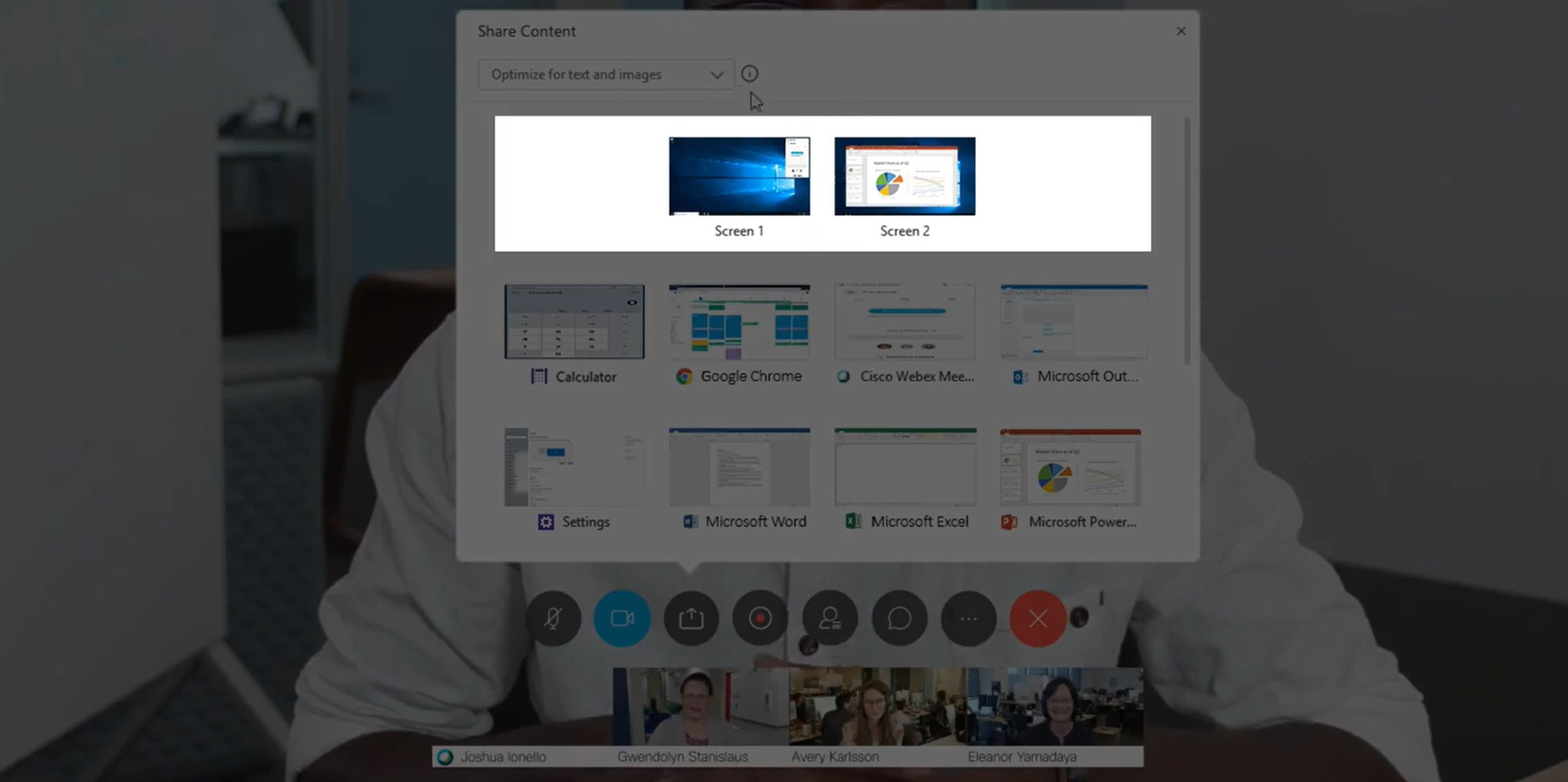
- Screen Sharing and Presentation Tools: Allows users to share their screen, documents, or presentations in real time, enhancing collaboration during discussions and demonstrations.
- Meeting Scheduling and Calendar Integration: Enables users to schedule meetings and sync them with calendar applications for better time management.
- Contact Management: Users can store and organize contacts to quickly initiate future meetings without re-entering participant details.
- Camera and Audio Controls: Offers options to disable the camera to reduce data usage while maintaining voice communication, ideal for low-bandwidth environments.
These features support practical scenarios such as remote team coordination, client onboarding, and virtual training sessions. For example, a project manager can share a live dashboard during a sprint review, while a trainer can present slides and interact with attendees via live Q&A. The app’s intuitive design ensures that even users with minimal technical experience can navigate these tools effectively. The developer did not specify advanced automation or AI-driven features, but the core functionality is built around reliability and ease of use.
Interface, UX & Performance
The user interface of Cisco Webex Meetings is designed with simplicity and functionality in mind. It features a clean layout with clearly labeled buttons for joining, starting, and managing meetings. Navigation is straightforward, with primary controls such as video, audio, screen share, and participant management placed within easy reach. The visual style is professional and minimal, reducing distractions during meetings. Users can quickly access meeting details, participant lists, and chat functions without navigating through multiple layers.
Although the developer did not list formal performance metrics, the app is designed to operate efficiently on standard Windows devices. It maintains responsiveness during active sessions, with minimal lag in video and audio transmission when network conditions are stable. Stability is supported by Cisco’s proven infrastructure, which handles concurrent connections without significant degradation. The app does not exhibit visible crashes or freezes in typical usage scenarios. However, specific requirements for device hardware or operating system versions were not disclosed. Performance may vary depending on the user’s internet speed and device capabilities, but the app appears optimized for consistent behavior across different device categories.
Platform Compatibility & Technical Requirements
Cisco Webex Meetings is available for the Windows platform, with a current version of 41.11.0. The application has a file size of 184.4 MB, making it a lightweight download suitable for most Windows systems. It is offered at no cost, with no in-app purchases or subscription tiers required for basic functionality. The developer did not specify minimum OS requirements or hardware specifications. Compatibility information was not fully disclosed, so users should ensure their system meets general Windows compatibility standards. The app is designed to run on desktop and laptop computers, though mobile availability was not confirmed in the provided data.
Pros and Cons
Pros
- Free to download and use, with no hidden costs.
- High-quality video and audio performance for reliable meetings.
- Intuitive interface suitable for users of all technical levels.
- Efficient contact management for recurring meetings.
- Supports camera off mode to reduce data usage during calls.
Cons
- Platform availability for mobile devices was not specified.
- Minimum system requirements were not listed.
- Advanced customization options were not detailed.
- Integration with third-party tools was not confirmed.
- Specific performance benchmarks were not provided.
FAQ
Is Cisco Webex Meetings safe to use?
The app is developed by Cisco Systems, Inc., a company known for its strong security standards. While specific security protocols were not detailed, the app benefits from Cisco’s enterprise-grade infrastructure, which includes encryption and access controls.
Can I use Webex Meetings on mobile devices?
The developer did not confirm mobile availability. The app is currently listed for Windows, and no information was provided about iOS or Android versions.
How do I update Cisco Webex Meetings?
Updates are typically delivered automatically through the Windows app store or the official Cisco website. Users should ensure they are running the latest version for optimal performance and security.
Is there a limit on meeting duration?
The developer did not specify meeting duration limits. Based on standard industry practices, free versions may have time restrictions, but no such details were provided in the input.
Can I join a meeting without installing the app?
While the app is designed for installation, Cisco Webex Meetings often allows users to join meetings via a web browser. However, the developer did not confirm this feature in the provided information.
Final Thoughts
Cisco Webex Meetings stands out as a dependable and accessible tool for professionals seeking high-quality video conferencing without the complexity. Its clean interface, reliable performance, and free access make it an attractive choice for teams prioritizing seamless communication. The app’s alignment with remote work trends and its foundation in Cisco’s trusted technology reinforce its value in modern collaboration ecosystems. While some technical details remain unspecified, the core experience remains strong and user-focused. For individuals and organizations looking to enhance team communication and remote productivity, Webex Meetings delivers consistent results. Download Cisco Webex Meetings now.
Guides & Tutorials for Cisco Webex Meetings
How to install Cisco Webex Meetings
- Click the Preview / Download button above.
- Once redirected, accept the terms and click Install.
- Wait for the Cisco Webex Meetings download to finish on your device.
How to use Cisco Webex Meetings
This software is primarily used for its core features described above. Open the app after installation to explore its capabilities.
User Reviews for Cisco Webex Meetings 0
No reviews found


